Last Updated: May 21, 2026 | By The E3 Aviation Editorial Team
Most GA pilots skip the VFR flight plan. They tell themselves flight following covers it. It doesn’t. The plan is a search-and-rescue contract with Flight Service. If you go missing, it’s the document that gets airplanes looking for you. Flight following ends when you change frequencies.
The filing process has also changed. The old domestic form is gone. Every civil aircraft now files in ICAO format, even for a 45-minute hop to the next state. That trips up pilots who learned the old form. The fields are different. The equipment codes are different. The activation rules are different.
This guide walks through how to file in 2026 — in ForeFlight, on 1800wxbrief.com, or by phone. We’ll cover the ICAO fields that matter and the activation tricks most pilots miss. And the closing habit that keeps the FAA from launching a search the next morning.
What a VFR Flight Plan Actually Does
A VFR flight plan is not an ATC clearance. ATC isn’t tracking you when you file one. The plan sits with Flight Service. The only people who care about it are the ones who would launch a search if you disappeared.
That’s the entire point. When you file and activate, you’ve started a timer. Your estimated time of arrival becomes a deadline. If you haven’t closed the plan within 30 minutes of that ETA, Flight Service starts calling. If they can’t reach you, the system escalates.
The escalation has a sequence. First an Information Request (INREQ) goes out at one hour overdue. Then an Alert Notice (ALNOT). Then the actual search. Three phases, hours apart. By the time the search starts, every minute counts.
Here’s what most readers get wrong: flight following is not a substitute. Flight following gives traffic advisories and a discrete code while you’re in radio contact. The moment you lose comms or change frequencies, that service ends. Nobody is logging your overdue arrival.
The plan keeps logging your arrival until you close it. That’s the difference. One service helps you while you fly. The other helps after you stop flying — and not in the way you want.
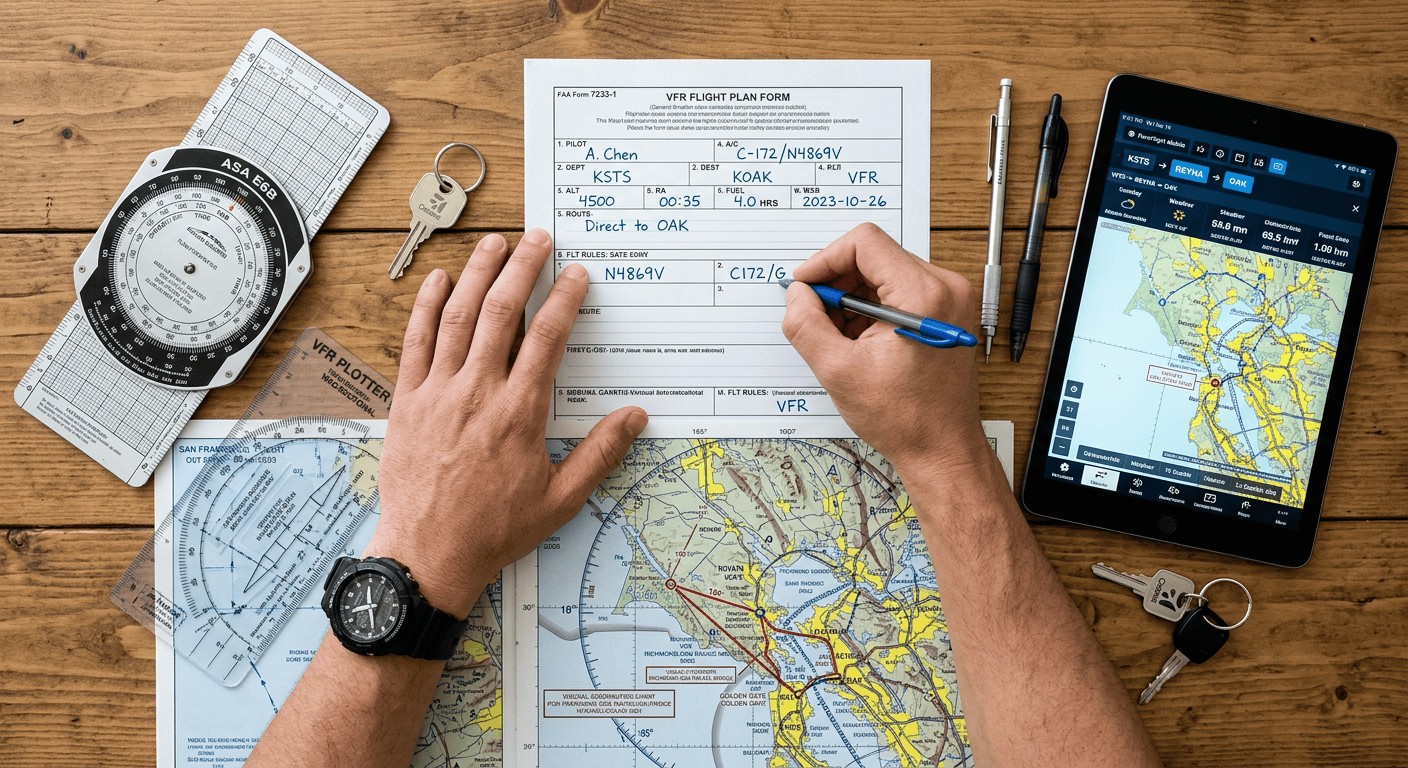
When You Should File One (and When You Shouldn’t)
The honest answer: file a VFR flight plan for any cross-country over unfamiliar terrain or water. File anywhere SAR would have to look for you. The 30-minute pattern hop to grab a $100 hamburger isn’t worth the paperwork. A four-hour run from Texas to Idaho absolutely is.
We’ll be straight with you: a lot of pilots don’t file because filing used to be annoying. That excuse died with the smartphone. Filing in ForeFlight takes about 40 seconds if your aircraft profile is set up.
File when you’re flying mountain terrain, over deserts, across the Gulf, or into the backcountry. File on any leg longer than your typical training-area radius. Skip pattern work, multi-stop local flights, and short transitions where SAR couldn’t find you anyway. For everything in between, file.
The ICAO Format Took Over — What Changed
The FAA retired the domestic flight plan format. Every civil VFR flight plan now uses ICAO Form 7233-4. If you haven’t filed since the late 2010s, this is the biggest change you’ll notice.
The form has more fields. The equipment section is letter-coded instead of suffix-coded. Item 18 takes free-text additions. Item 19 holds the search and rescue data that never goes to ATC. Most apps build this form for you. But you still need to understand what the letters mean.
The good news: once your aircraft profile is right in ForeFlight or 1800wxbrief.com, the system remembers it. You’re not retyping equipment codes every time you file.
How to File a VFR Flight Plan in ForeFlight
ForeFlight is the path most GA pilots use to file a VFR flight plan today. Filing inside the app pushes your data straight to Leidos Flight Service. Here’s the cleanest workflow.
Step 1: Build the Flight
Open ForeFlight. Tap Flights, then New Flight. Enter departure, destination, and your route. Use waypoints, victor airways, or direct GPS. The app calculates distance, time, and fuel burn from your saved profile.
Step 2: Set Your Aircraft and Equipment
Pick your aircraft from the Aircraft picker. Your ICAO equipment codes load automatically. If you haven’t built your profile yet, do it once and you’re done forever. Common GA codes: SDG/C for VFR with VHF, VOR, ILS, ADF, GPS, and Mode C. Add B if you have ADS-B Out. Most modern GA aircraft are SDFGRY/S or similar.
Step 3: Choose VFR and File
In the File tab, set Flight Rules to VFR. Pick your altitude. Set off-block time and departure time in Zulu. Confirm endurance, persons on board, and emergency equipment in Item 19. Tap File. ForeFlight sends the plan to Flight Service and confirms acceptance within seconds.
Save the flight. You’ll need it later to activate and to close.

How to File at 1800wxbrief.com and on the Phone
1800wxbrief.com is the official Leidos Flight Service portal for filing a VFR flight plan. It’s free, it gives a full briefing, and it files the same ICAO format ForeFlight uses. The interface looks dated, but it works.
From the homepage, sign in. Click Flight Planning and Briefing, then File a Flight Plan. The form is the ICAO 7233-4 broken out into sections. Fill departure, destination, aircraft ID, and type designator. Add equipment, route, altitude, and true airspeed. Then departure time, time enroute, fuel on board, persons on board, color, and pilot contact info. Submit.
Pilots who prefer voice: call 1-800-WX-BRIEF. A briefer takes the plan over the phone. Have your tail number, equipment, route, and times ready. The briefer will read it back. Confirm it.
The Phone Workflow Most Pilots Don’t Know
If you’re already in ForeFlight and want a voice touchpoint, tap the filed flight and hit the Dial button. It pulls up 1-800-WX-BRIEF with your tail number in context. Useful when cell service is spotty and you need to confirm the plan is filed before you taxi.
The ICAO Fields That Trip Up GA Pilots
Most ForeFlight users never look at the raw ICAO fields on a VFR flight plan. Then they get a Reject message back from Flight Service. They have no idea what to fix. Here are the fields worth understanding.
Item 7 — Aircraft Identification
Your N-number. No dash. N1234A not N-1234A. ICAO strips dashes.
Item 8 — Flight Rules and Type of Flight
V for VFR. G for general aviation. A typical GA VFR plan shows VG. If your route mixes IFR and VFR segments, use Y (IFR first) or Z (VFR first). Pure VFR is V.
Item 9 — Aircraft Type Designator
Four-letter ICAO designator. Cessna 172 is C172. Cessna 182 is C182. Cirrus SR22 is SR22. Bonanza A36 is BE36. If you don’t know yours, the FAA aircraft type designator list lives on the ICAO doc8643 site.
Item 10 — Equipment Codes
This is where most pilots stumble. Letters before the slash describe nav/comm. The letter after the slash is the transponder. A basic VFR Cessna with GPS, ILS, and Mode C transponder is SG/C. Add D for DME and F for ADF. Add R for RNAV approach capability. Add Y for 8.33 kHz VHF spacing if you fly Europe. Add B for ADS-B Out. Get the codes right in your aircraft profile once and forget about them.
Item 15 — Route
Departure runway not required. Just the route from departure to destination. Use airway identifiers (V23), waypoint codes, and DCT for direct between two fixes. ForeFlight builds this automatically from your route line.
Item 18 — Other Information
Free-text additions. PBN/ for performance-based nav capability. DOF/ for date of flight if filing more than 24 hours ahead. EET/ for estimated elapsed time at FIR boundaries (international only). For domestic VFR, most pilots leave this nearly empty.
Item 19 — Search and Rescue Info
This is the SAR data. E/ is endurance in hhmm format. P/ is persons on board. R/ is emergency radios. S/ is survival equipment. J/ is jackets. D/ is dinghies. A/ is aircraft color and markings. C/ is pilot in command name. N/ is remarks.
Honestly, this is where we’d push back on the “filing is too much work” complaint. Item 19 is the section that saves lives. It takes one minute to set up in your profile. It never changes after that. Fill it once. Forget about it.

Activating Your VFR Flight Plan — Three Ways
Filing is half the job. A VFR flight plan does nothing until it’s active. ATC isn’t watching for you. Flight Service can’t start the SAR clock on a plan that’s still in proposed status.
Phone Activation Through Flight Service
The classic method. Call 1-800-WX-BRIEF on the ground or in the air. Give your N-number, departure airport, and actual takeoff time. The briefer activates the plan. Done.
Ask ATC at a Towered Field
At a towered airport, ground or tower can activate your plan when you tell them you have one filed. It’s a courtesy. They’ll do it as workload permits. Don’t count on it during a busy push, but it works most of the time at a Class D.
Open in the Air After Takeoff
Didn’t activate before departure? Climb to a usable altitude and contact Flight Service on 122.2 or the local FSS frequency. Say “Open my flight plan, N1234A, departed [airport] at [time].” Flight Service activates it on the spot.
One more option: ForeFlight has an Activate button in some regions when the underlying service supports it. Tap it on the filed flight. The app sends the activation request and shows confirmation. Coverage is patchy. Phone is still the most reliable method.
Closing Your VFR Flight Plan Before the SAR Clock Starts
Closing a VFR flight plan is the most-blown step in this whole process. You land. You’re tired. You taxi to the FBO, shut down, and go inside for a hot dog. Forty minutes later your phone rings. It’s Flight Service. They want to know if you’re alive.
That’s the polite version. The version where your phone is dead is worse. INREQ goes out at one hour overdue. Then ALNOT. Then the FAA pulls up your route and starts looking for the airplane. Civil Air Patrol gets a tasking order.
Close the plan immediately on landing. Three ways:
Phone: call 1-800-WX-BRIEF, give your N-number and “close my flight plan.” Takes 30 seconds.
ForeFlight: open the active flight, tap Close. Confirmation appears in the app.
Towered field: ground or tower can close it for you on request. Same caveat as activation — courtesy, not guaranteed.
For untowered destinations, close as soon as you have cell service. If you land in a remote backcountry strip with no signal, close in the air before descent. Worst case, the briefer will work with you on a delayed close.
Common Mistakes That Get GA Pilots in Trouble
The pattern repeats: same five mistakes, same outcome.
Mistake one — confusing flight following with a VFR flight plan. They’re not the same. File the plan AND ask for flight following for both layers of protection.
Mistake two — filing but never activating. The plan sits in proposed status. Flight Service doesn’t know you’re flying. SAR never triggers because the clock never started.
Mistake three — overestimating your ETA. Set ETA at three hours and arrive in two and a half? No problem. Set it at three hours and take a four-hour detour around weather? You’ve blown past your ETA without telling anyone. Amend in flight. Call Flight Service. Push the time.
Mistake four — forgetting to close. The biggest one. Build a habit: brake set, mixture cut, master off, close the plan. Same sequence every time.
Mistake five — filing the wrong destination. The destination on your plan is where SAR will look. If you divert and don’t amend, SAR will look at the wrong airport for hours. Always amend to reflect your actual destination.
One bonus mistake we see in flight reviews: filing the plan but never telling your passengers what to expect. The 1-800-WX-BRIEF call after landing isn’t a secret. Tell your right-seat passenger what you’re doing and why. If something happens to you in flight, your passenger knowing how to close the plan is a small thing. It becomes a very big thing fast. Build it into your passenger briefing. Show them the number. Show them what to say.
Our Take on the SAR Clock
Filing a plan is one of the cheapest insurance policies in general aviation. Forty seconds in ForeFlight buys you a search if you go down. The pilots who skip it think a crash won’t happen to them. That’s the same thinking behind most fatal GA accidents.
E3 was built around doing the small disciplined things well. Pre-flight. Weight and balance. Density altitude math. Passenger briefings. Filing the VFR flight plan. None of them are glamorous. All of them add up. The pilots in our community fly hard, fly often, and come back every time.
If you’re not a member yet, join us. The community is built by pilots, for pilots. Combat aviators, backcountry pros, aerobatic champions, and instructors who’ve forgotten more about IFR than most CFIs have learned. We trade real-world stories, post our adventure flights, and share honest product reviews. We answer the kind of pilot questions that Reddit threads can’t really answer. Membership is at e3aviationassociation.com.
FAQ
Is filing a VFR flight plan required by the FAA?
No. It’s voluntary in U.S. domestic airspace. It’s strongly recommended for cross-country flight because it activates SAR if you don’t arrive. International flights and Defense VFR (DVFR) flights through ADIZ airspace are different. Those require a filed plan by regulation.
How long can I file the plan ahead of departure?
Up to 24 hours in advance through 1800wxbrief.com or ForeFlight without using the DOF/ field. To file further out, add DOF/YYMMDD in Item 18 to specify the actual date of flight. Most pilots file 30 minutes to 2 hours before takeoff. That gives the briefer current weather context.
What’s the difference between a VFR flight plan and flight following?
A VFR flight plan is a search and rescue contract with Flight Service. It doesn’t involve ATC tracking. Flight following is a real-time ATC service. It gives traffic advisories and a discrete code while you’re in radio contact. They serve different purposes. File the plan for SAR coverage. Request flight following for ATC support. Use both for any meaningful cross-country.
Further Reading on E3 Aviation
The natural cross-country pairings on E3 are VFR Weather Minimums and the ForeFlight Complete Guide. Also the Cessna 172 Complete Pilot Guide, Density Altitude, Aircraft V-Speeds, and the Holding Pattern Entry guide.