Last Updated: May 18, 2026 | By The E3 Aviation Editorial Team
Four out of five GA pilots flying with an EFB are using ForeFlight. The other one’s wondering if they made a mistake. This guide answers the questions driving 21,000 monthly searches. What does the app actually do? Which subscription tier do you need? How do the receivers fit in? Is it worth the new 2026 price?
We’ll be straight with you: ForeFlight isn’t perfect. It also isn’t cheap anymore. But for most GA pilots, it’s still the cockpit kit that delivers the most value per dollar. Here’s the full picture — without the marketing gloss.
What ForeFlight Actually Is
ForeFlight is an electronic flight bag, or EFB. It runs on iPad and iPhone. It’s also a web planner. Pilots use it to file flight plans, brief weather, navigate, view charts, store logbooks, and connect to avionics. Boeing bought it in 2019. It’s now the dominant EFB across U.S. GA, business aviation, and most pro flight departments.
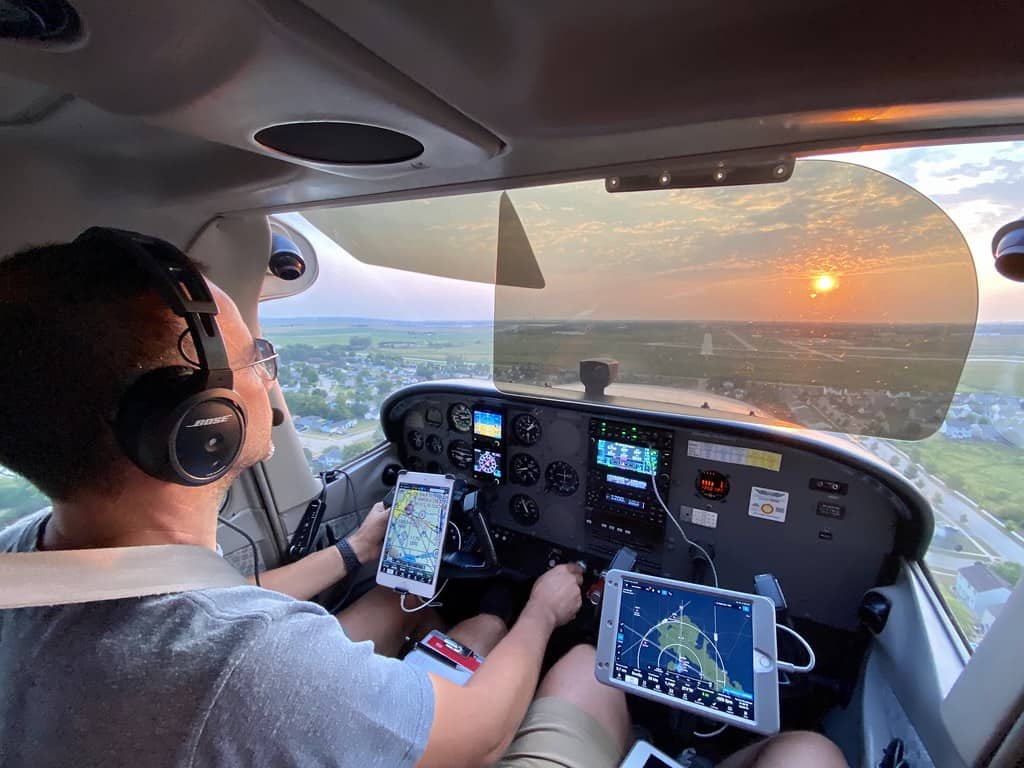
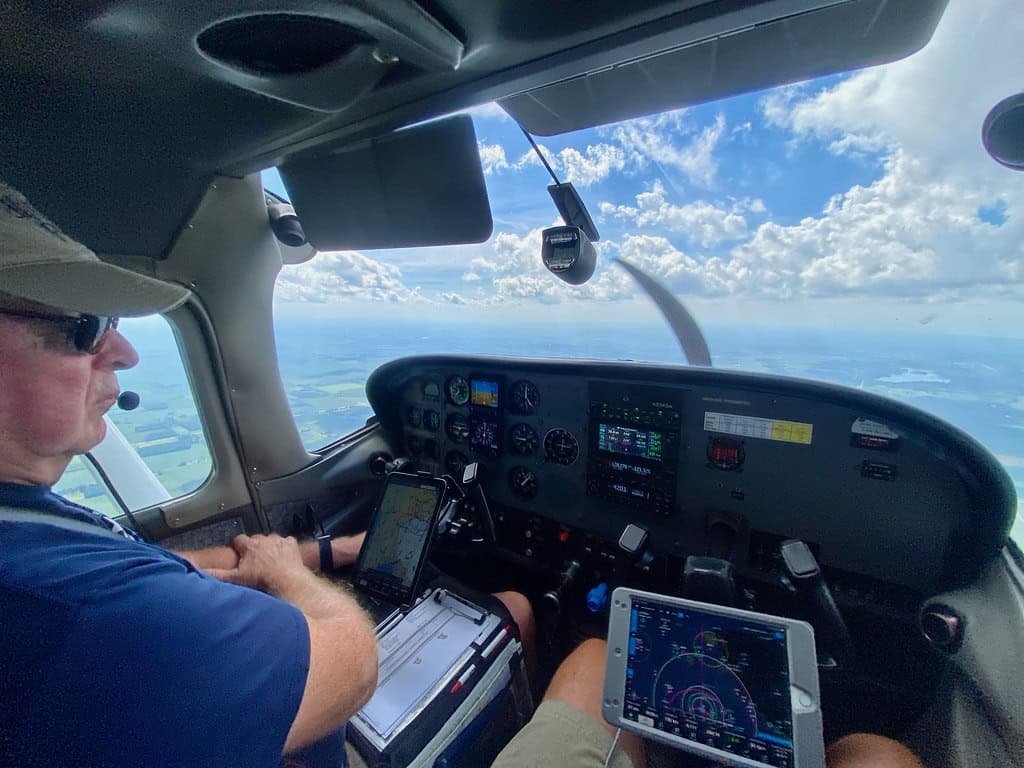
Sit in the right seat of a GA airplane lately. Odds are the iPad on the yoke is running this app. It runs on a freemium model. The app itself is free to download. You need a subscription to actually use it for flying.
Who ForeFlight Is Built For
The app is built for GA pilots first. That covers everyone from a student pilot in a 152 to a Citation captain in a King Air 350. The interface scales with the pilot. A VFR-only private pilot uses a fraction of the feature set. An IFR-current owner-operator uses most of it. A pro corporate crew uses all of it.
What it isn’t built for: airline ops with company-specific charting (Jeppesen and Lido still own that lane). Also: pilots behind full Garmin glass who want tight two-way nav sync. More on that trade-off later.
The 2026 ForeFlight Subscription Tiers
The company rebranded its tier names in early 2026. The features are the same — the labels changed. Here’s what each tier costs and what you get, after the February 2026 price bump.
Starter — $129.99 per year
The entry tier. You get VFR sectionals, terminal area charts, and IFR enroute charts. Plus airport diagrams, weather briefings, flight planning, document storage, and Track Logs. No procedure plates. No geo-referenced approaches. No synthetic vision. Honestly, this tier exists to get pilots into the ecosystem. It covers a VFR-only private pilot doing local flights and that’s about it.
Essential — $259.99 per year
This is the tier most active GA pilots end up on. You get everything in Starter plus geo-referenced approach plates and SIDs/STARs. Add a graphical preflight briefing, ForeFlight Logbook, scratch pads, and Procedure Advisor. If you fly IFR, this is the floor. If you’re VFR but you want approach plates for the day you need them — this is also the floor.
Premium — $389.99 per year
The full-featured GA tier. Adds Synthetic Vision, Hazard Advisor terrain warnings, profile view, advanced 3D Preview, and high-res CONUS imagery. Power users and owner-operators tend to land here. The synthetic vision alone is worth a hard look if you ever fly into mountainous terrain or at night.
Business Pro and Business Performance
The fleet and corporate tiers. They add multi-aircraft profiles, cloud document sharing, schedule integration, and FOQA-style flight data. If your name is on the airplane and your name is on the company, this is your tier. Otherwise it’s overkill.
The Features That Actually Matter
Most pilots use maybe 30% of what ForeFlight offers. Here’s the 30% that actually carries the experience.
The Map and Touch Planning
You build a route by tapping airports on the moving map. Drag the magenta line around weather. Drop waypoints. That’s it. No keyboard, no menus. It’s faster than any other planning interface in aviation — including Garmin Pilot, which we’ll get to.
The map renders sectional, IFR low/high, VFR/IFR hybrid, and its own basemap. You overlay weather (radar, satellite, sat-cloud-tops), TFRs, PIREPs, ADS-B traffic, and route advisories. It’s clean. It’s fast. And it just works.
Graphical Preflight Briefing
One of the app’s quiet superpowers. Tap “Brief.” The app pulls METARs, TAFs, AIRMETs, SIGMETs, PIREPs, NOTAMs, winds aloft, icing, and TFRs into one document. It also paints a flight-rules overlay along your route. Green for VFR, blue for MVFR, red for IFR, magenta for LIFR. You see at a glance where the weather’s going to hurt you.
This is what replaced the old DUATS briefing call. And it’s a far better tool than what most pilots had ten years ago. It also satisfies the FAA’s Part 91.103 preflight action requirements. The FAA lays this out in the Pilot’s Handbook of Aeronautical Knowledge.
Flight Plan Filing — VFR and IFR
You build the route. You tap “File.” The app sends it to Leidos as an ICAO-format VFR or IFR plan. You can pre-stage clearance, get pre-departure clearance (PDC) at major airports, and pull digital ATIS. For IFR pilots flying out of busy Class B and C fields, this alone justifies the subscription.
Geo-Referenced Plates and Airport Diagrams
Available from the Essential tier and up. You shoot an approach and your aircraft icon moves down the plate in real time. Same thing on the airport diagram during taxi. This is what changed instrument flying. Used to be you’d glance at a paper plate strapped to your kneeboard. Now the plate moves with you. Once you fly with this, you don’t go back.
Synthetic Vision
Premium tier. Premium generates a 3D outside-the-windshield view from terrain data + your GPS position. Useful at night, useful in haze, indispensable in mountainous terrain. It also drives Hazard Advisor. Terrain you’d hit at altitude shades red. Terrain within 1,000 feet of altitude shades yellow.
Our take: synthetic vision turned the iPad from a “nice to have” into a real safety tool. Worth the upgrade if you fly anywhere with terrain.
Logbook
The built-in Logbook auto-fills from Track Logs. You fly the leg. The app records it. You tap to log. Endorsements, currency tracking (day, night, instrument, complex, tailwheel, high performance), and PDF export are all built in. It’s not perfect. Power users still hit limits with custom fields. But for 90% of pilots it’s good enough to retire the paper version.
ForeFlight and the Sentry ADS-B Receivers
The app will run as a planning and charting app without any external hardware. But the moment you add an ADS-B receiver, the app becomes something different — a live in-flight situational awareness system. Its first-party receivers are the Sentry family.
Sentry Mini — The Budget Pick
Roughly the size of a deck of cards. Dual-band ADS-B in (978 + 1090), GPS, and 9-hour battery. No AHRS, no carbon monoxide monitor. Around $499. If you just want subscription-free FIS-B weather and traffic on the iPad, this is the smallest, cheapest path in.
Sentry — The Sweet Spot
The middle Sentry adds AHRS, a carbon monoxide monitor, and a 12-hour battery. The AHRS feeds synthetic vision without an avionics tie-in. The CO monitor has caught real leaks in real airplanes. Around $649. This is what most pilots end up buying. The CO monitor alone is hard to argue against once you understand how silently carbon monoxide kills.
One quiet reason the middle Sentry pulls ahead: most CFIs and aerobatic instructors run this exact model. If the people who teach for a living pick it, that’s a strong signal.
Sentry Plus — The Loaded Pick
Adds a status display screen, an 18-hour battery, a G-meter, and a flight data recorder. Around $799. If you fly multi-day trips, do aerobatics, or want a redundant flight data record, this is the one. For most pilots, Sentry (middle model) is the better value.
The Web Planner Most Pilots Ignore
Worth calling out separately: every paid subscription includes a web-based planner at plan.foreflight.com. You can build routes, brief weather, and file flight plans from any browser — no iPad needed.
Most pilots never use it. They should. Sitting at the kitchen table the night before a trip, looking at the briefing on a big monitor? Beats squinting at an iPad in a noisy hangar. Build the plan at home. Sync. Fly.
ForeFlight vs Garmin Pilot — The Honest Take
The other serious EFB in U.S. GA is Garmin Pilot. Both apps are good. They’re not interchangeable, and the choice depends almost entirely on what’s in your panel.
If You Fly Behind Garmin Glass
If your panel is a GTN 650/750, G1000 NXi, G3X Touch, or G3000 — Garmin Pilot wins. The two-way flight plan sync is real, and it’s tight. You build a route on Garmin Pilot, push it to the navigator, and fly. Changes the GPS makes in flight flow back to the iPad. Charts auto-bind into a Smart Charts binder. Aircraft data integrates cleanly.
This isn’t a small thing. Two-way sync kills one of the most common cockpit errors. That’s the route in the panel and the route on the iPad disagreeing.
If You Fly Anything Else
ForeFlight wins. It has more weather sources, better map rendering, faster planning, and a more polished interface. Web planning at home is part of the package. It also dominates flight school curricula and pro flight departments. Move into charter, corporate, or instructing later, and you already know the tool.
The Cost Difference
Garmin Pilot costs less. Significantly less in the lower tiers. Essential at $260 a year compares to Garmin Pilot Premium at around $180. For pilots watching cost — particularly student pilots and renters — Garmin Pilot’s a credible budget alternative.
Here’s what most pilots get wrong about this comparison: they pick the app, then fight the panel. The smarter move is to look at what’s in the airplane first, then pick the app that pairs cleanly. The integration story usually decides it for you before you ever open the App Store.
Setting Up ForeFlight — The First-Hour Checklist
New to the app? Here’s the setup sequence that gets you flying without wasted hours of trial and error.
First, download the app and start a 30-day free trial. Use a real flight you’ve got coming up as the test case — not a hypothetical. Set your aircraft profile (tail number, type, cruise speed, fuel burn, equipment codes). Without an aircraft profile, your performance numbers will be wrong and your filings will look amateur.
Second, download the chart regions you’ll actually fly in. Don’t download the whole U.S. — it eats storage. Pick your home state plus adjacent states plus any destination region. Re-download every 28 days when the data cycle updates.
Third, run through a touch-plan flight to a familiar airport. Tap your home field, tap your destination, drop a waypoint or two, look at the briefing, file the plan. Cancel it before you go. Now you’ve done the full cycle once and you’ll remember it.
Fourth, link your pilot certificate to the Logbook. Set your currency rules. Import any digital records you’ve got. The auto-track feature will start filling logbook legs the moment you start flying.
Fifth — and this matters — set your weather minimums in the app. The app will flag a flight as risky if it crosses lines you’ve set. Personal minimums baked in are a quiet safety feature most pilots ignore. Use them.
What ForeFlight Doesn’t Do Well
Honestly, this is where we’d push back on the “this app is perfect” framing some reviewers use.
The mobile pricing is now genuinely steep. After the February 2026 hike, Essential is $260 a year and Premium is $390. That puts the platform at the top of the EFB cost ladder. Garmin Pilot, FlyQ EFB, and Avare are all materially cheaper.
The Logbook is good, not great. Got 5,000 hours and custom currency needs? Contract work, type-specific recency, complex multi-rating? You’ll outgrow the built-in fields. Most pilots won’t. Some will.
The non-Garmin avionics integration is improving but still trails behind Garmin Pilot for tightly coupled panel work. Got a Dynon SkyView or a GRT system? You can get some integration. But it’s not as seamless as the all-Garmin path.
Offline reliability is excellent on iPad. It can be flaky on the iPhone version when the device is running other apps. Pilots flying with iPhone as primary EFB sometimes hit storage and memory issues that don’t show up on iPad. If you’re going to commit, commit to an iPad.
Is ForeFlight Worth It in 2026?
For most active GA pilots — yes. Graphical briefings, geo-referenced plates, in-flight ADS-B, the logbook, and synthetic vision combine into one tool. Fifteen years ago that toolkit cost $5,000 in panel-mounted hardware. At $260 a year for Essential, it’s still cheaper than most aircraft tiedown fees.
Pilots who shouldn’t pay for it: student pilots whose school provides the app already (most flight schools do). Renters who fly under ten hours a year — the trial plus paper sectionals is enough. And pilots behind full Garmin glass, who get more from Garmin Pilot’s tight integration.
Everyone else — fly with it. The trial is free. Use it on your next real flight. If it sticks, subscribe. If it doesn’t, you’ve lost nothing.
Frequently Asked Questions
Do I need a separate weather subscription to use ForeFlight in flight?
No. The in-flight weather is delivered via FIS-B from FAA ground stations, free, when you have an ADS-B receiver onboard. The app itself doesn’t charge for weather — your subscription covers all data sources. You can stream weather via SiriusXM if you have an SXAR1 receiver. That’s optional and adds a separate SiriusXM Aviation subscription cost.
Can I use ForeFlight on iPhone only, without an iPad?
You can — and lots of pilots do for backup. But the iPhone screen is small enough that it’s not ideal as a primary EFB. For real cockpit use, plan on an iPad Mini at minimum. The app is built around the iPad form factor. The iPhone version is best treated as a backup or quick-look tool.
How often does ForeFlight update its charts and data?
Every 28 days on the FAA’s AIRAC cycle. The app downloads updates automatically when you’re on Wi-Fi. Always download the new cycle a few days before it takes effect. Fly with expired charts, and you’re violating FAR 91.103. The FAA will treat that as a real violation if anything goes wrong.
The E3 Take
The smartest way to evaluate this tool isn’t to read another review. Use it on the next flight you’ve already got planned. Run the 30-day trial against a real cross-country. Brief the weather. File the plan. Fly the route with geo-referenced charts up. Log the leg afterward. You’ll know in one flight whether it earns the subscription.
At E3 Aviation Association, we built this site around what serious GA pilots actually use. Gear that earns its place in the cockpit. Knowledge that earns its place in your flight bag. It has earned both, for most pilots, most of the time. Questions on tier selection? Integrating with your specific panel? Whether Sentry beats a cheaper third-party ADS-B receiver? That’s the kind of decision the E3 community handles every day. Get in the conversation.
Further Reading on E3 Aviation Association
- Cessna 172: The Complete Owner and Pilot Guide for 2026
- Aircraft V-Speeds: Every GA Pilot’s Quick Reference
- Density Altitude: The Complete GA Pilot Guide for 2026
- Aircraft Weight and Balance: The Complete GA Pilot’s Guide for 2026
- Stall Recognition and Recovery: A GA Pilot’s 2026 Guide
- E3 Aviation Association