ForeFlight has transformed how aviation pilots handle flight planning and navigation. This electronic flight bag (EFB) app boosts safety, efficiency, and awareness. For pilots, it’s a vital tool that simplifies complex tasks daily. Whether you’re a weekend flyer or a professional, ForeFlight delivers unmatched capabilities. In this article, we’ll explore its features, secrets, and practical uses. Let’s see why ForeFlight for aviation pilots is a must-have now.
What Is ForeFlight?
First, ForeFlight is an iOS and web-based EFB app for pilots. It offers interactive maps, weather updates, and flight planning tools. Additionally, it’s widely used by general aviation, business, and military pilots. According to the FAA Pilots, EFBs enhance cockpit efficiency significantly.
Moreover, ForeFlight syncs with avionics for real-time data sharing. This integration improves situational awareness mid-flight. For example, it connects to ADS-B receivers for live traffic updates. Many pilots overlook its deeper potential beyond planning. Curious about tech tools? Check this aviation technology integration guide.
Core Features of ForeFlight for Aviation Pilots

Next, ForeFlight’s features are robust and pilot-focused. Here’s what stands out:
- Maps & Charts: FAA VFR/IFR and Jeppesen global charts with weather overlays.
- Weather Tools: Dynamic radar, 3D icing previews, and turbulence forecasts.
- Flight Planning: Touch Planning for routes and wind-optimized filing.
- Safety Features: Terrain alerts, synthetic vision, and digital checklists.
Furthermore, these tools improve safety and streamline tasks. For instance, synthetic vision provides a 3D terrain view. This helps during low-visibility flights. Want more on planning? See this flight planning tools overview.
Who Uses ForeFlight?
Meanwhile, ForeFlight benefits a broad pilot community. Here’s how it helps:
- General Aviation: Simplifies preflight for private pilots.
- Business Pilots: Optimizes routes for efficiency.
- Commercial & Military: Supports complex missions with precision.
Additionally, it reduces workload across all flying levels. This is key in busy airspace.
Benefits of Using ForeFlight
Now, let’s explore the advantages ForeFlight offers pilots. First, it saves time with streamlined planning. Pilots can plan routes in minutes, not hours. Second, it enhances safety through real-time updates. Weather and traffic data keep risks low.
Moreover, it boosts confidence with accurate tools. Features like Jeppesen charts ensure precise navigation. Also, it reduces paper clutter in the cockpit. Digital checklists and logs simplify operations. Finally, its versatility suits all pilot types. From students to pros, everyone gains value.
A Day-in-the-Life with ForeFlight
However, how does ForeFlight fit into a pilot’s day? Here are three examples:
Private Pilot: Sarah, a weekend flyer, starts her day at 7 a.m. She opens ForeFlight to plan a VFR trip. Using Touch Planning, she maps a route from KAPA to KBJC. Next, she checks weather overlays for clouds. In-flight, she tracks her position on the moving map. After landing, she logs her 1.5 hours digitally.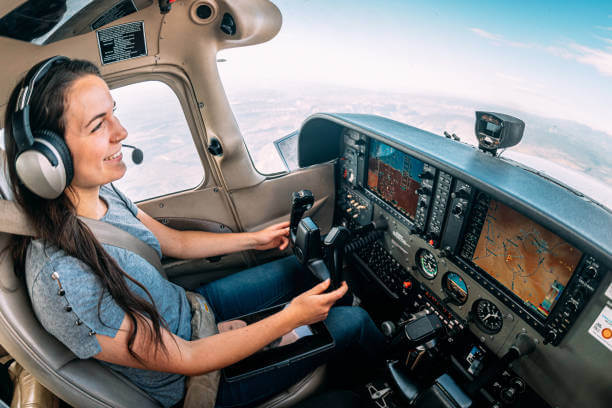
Business Pilot: John flies a Citation jet for work. At 9 a.m., he uses ForeFlight to file an IFR plan. He selects a wind-optimized route from KORD to KLAX. During preflight, he reviews 3D turbulence forecasts. In-flight, he monitors ADS-B traffic. Post-flight, he updates his logbook seamlessly.
Commercial Pilot: Maria, a cargo pilot, preps at 5 p.m. She plans a night flight over mountains in ForeFlight. Using synthetic vision, she visualizes terrain risks. She files her plan and checks NOTAMs graphically. In-flight, she adjusts for weather using live radar. She logs her hours afterward.
Thus, ForeFlight adapts to any pilot’s routine.
How to Use ForeFlight In-Flight

Next, using ForeFlight during flight is straightforward. First, mount your iPad securely. Ensure it’s charged or plugged in. Then, open the app and load your flight plan. The moving map tracks your position via GPS.
Additionally, monitor weather with dynamic overlays. Tap the radar layer for updates. Also, use synthetic vision for terrain awareness. Adjust layers like traffic or airspace as needed. Finally, refer to digital checklists. This keeps critical tasks on track. For in-flight tips, check in-flight navigation tools.
Hidden Secrets Most Pilots Don’t Know
Meanwhile, ForeFlight hides powerful secrets. Here are seven lesser-known features:
- Custom Content Packs: Add waypoints or mission data. Great for survey flights.
- Trip Assistant: Plans total trip time, including ground travel. Ideal for scheduling.
- Route Constraints: Avoid airspace or waypoints. Useful for international trips.
- Integrated Weight & Balance: Links to plans for live data. Perfect for load checks.
- 3D View Training: Syncs with simulators for practice. Sharpens approach skills.
- Jeppesen Global Charts: Access worldwide charts. Key for global navigation.
- Dynamic Logbook Endorsements: Sign logs digitally. Speeds up training.
For instance, Route Constraints can dodge restricted zones. Few pilots use this trick.
Advanced Examples of ForeFlight in Action
Besides, ForeFlight excels in complex scenarios. Here are advanced uses:
- Transatlantic Flight: Navigate from JFK to LHR with Jeppesen charts. Overlay Eurocontrol data.
- High-Altitude Jet: Optimize a G650 route at 35,000 ft. Use wind data for efficiency.
- Mountain Night Flight: Visualize Rockies terrain with synthetic vision. Stay safe in low visibility.
- Busy Approach: Select LAX STARs with Procedure Advisor. Reduce delays effectively.
Therefore, ForeFlight handles tough missions well.
Do’s and Don’ts of ForeFlight
However, using ForeFlight wisely is key. Here’s a quick guide:
Do’s: Update charts regularly for accuracy. Use ADS-B integration for live data. Practice with 3D View before flights. Back up your iPad data often. Customize settings for your aircraft.
Don’ts: Don’t rely solely on ForeFlight. Have paper charts as backup. Don’t ignore battery life in-flight. Avoid overloading with too many layers. Don’t skip preflight weather checks.
Consequently, these tips ensure safe usage.
Why ForeFlight Matters Today
Finally, ForeFlight is crucial in modern aviation. It blends planning, safety, and navigation seamlessly. Its hidden features—like Custom Packs—add unique value. As technology advances, such tools become essential.
Moreover, safety improves with real-time alerts. Efficiency rises with tools like Trip Assistant. For aviation trends, explore E3 Aviation articles. Learn more about aviation safety today!
For more E3 Aviation resources, be sure to visit: https://e3aviationassociation.com
External Links:
- FAA Pilots Resources
- Aviation Weather Center
- Flying Magazine pilot resources
- Boldmethod Aviation Training
- General Aviation News community
https://e3aviationassociation.com/do-you-make-these-mistakes-as-a-pilot/
ForeFlight Pricing and Plan Comparison for 2026
Practically, ForeFlight runs four subscription tiers as of 2026, each targeted at a specific pilot profile. Specifically, the Basic Plus tier at $99/year covers VFR-only pilots who need flight planning, weather briefings, and basic moving-map navigation. Most student pilots and casual weekend flyers fit this tier cleanly. Critically, Basic Plus excludes IFR charts and georeferenced approach plates — those start at Pro Plus.
Last Updated: May 31, 2026 | By: The E3 Aviation Editorial Team
For pilots flying IFR, the Pro Plus tier at $199/year unlocks IFR enroute charts, georeferenced terminal procedures (approach plates that show your aircraft position on the chart), and the Track Logs feature that records every flight automatically. Furthermore, the Pro Plus tier is the sweet spot for most owner-pilots: enough capability to support real cross-country IFR flying without paying for features dedicated charter and Part 135 operators need.
Performance Plus at $299/year adds Performance Plus optimization (continuous fuel calculation against winds aloft), Schedule Plus for crew/aircraft scheduling, and additional cockpit weather options. Realistically, this tier is overkill for most owner-pilots — useful primarily for two-pilot operations or owner-operators flying complex aircraft on tight performance margins.
Business Performance at $399+/year handles multi-pilot operations, Part 135 dispatch requirements, and advanced enterprise features. Notably, most GA owner-operators never need this tier. Most pilots overpay by subscribing to a higher tier than their actual mission requires.
ForeFlight vs Competing EFB Apps
For comparison, ForeFlight’s main competitors in the 2026 EFB market are Garmin Pilot ($79.99/year basic, $179.99/year premium), FltPlan Go (free with WingX subscription), and Avare (free, open-source). Each has trade-offs that matter depending on your equipment and mission.
ForeFlight vs Garmin Pilot
Specifically, Garmin Pilot integrates more tightly with Garmin avionics — if you own a Garmin GTN navigator, GNS 530/430, or G1000 panel, Garmin Pilot syncs flight plans bidirectionally without third-party hardware. ForeFlight requires a separate Sentry or Stratus ADS-B receiver to push flight plans to your panel.
However, ForeFlight’s interface is significantly more refined. Realistically, pilots who don’t have Garmin avionics in their aircraft find ForeFlight’s UX, weather presentation, and chart rendering noticeably better. The choice often comes down to which panel you already fly behind.
ForeFlight vs FltPlan Go
Notably, FltPlan Go is free with a WingX subscription and offers most of the same features as ForeFlight Pro Plus. The trade-off: FltPlan Go’s user experience is rough by comparison, the moving map rendering is less polished, and support is minimal. For pilots flying 20-30 hours a year who want to minimize cost, FltPlan Go is workable. For pilots who fly regularly, ForeFlight’s $199 Pro Plus tier is worth the upgrade.
ForeFlight Hardware Companion Decisions
Above all, ForeFlight is only as useful as the hardware running it. Specifically, an iPad with a dedicated ADS-B receiver creates a capable EFB setup; an iPad alone misses critical features like traffic and weather in flight.
iPad Selection for ForeFlight
Practically, ForeFlight runs on any iPad released after 2017 — but real-world cockpit performance varies dramatically. The 11″ iPad Pro is the gold standard: bright enough for direct-sun panel mount, fast enough to render IFR plates instantly, and large enough that touch targets work in turbulence. The standard 10.9″ iPad works fine for VFR work but struggles in direct sunlight without a brightness boost case.
ADS-B Receiver Choice
Specifically, the Sentry Mini and Stratus 3 are the two ForeFlight-optimized ADS-B receivers most owner-pilots choose. Sentry Mini at $399 is the lighter option. Stratus 3 at $899 has a built-in AHRS for backup attitude indication. For pilots flying behind glass panels with attitude information already available, Sentry Mini is the practical choice. For pilots flying steam gauges or wanting backup AHRS, Stratus 3 earns its premium.
E3 Aviation Editorial Team
The E3 Aviation Association editorial team is made up of licensed pilots, aviation educators, and industry professionals dedicated to advancing general aviation safety, community, and education. Learn more about E3 Aviation.